





-800x800.jpeg "Insta360 ANTIGRAVITY A1 8K 360 Drone Explorer Bundle")
-800x800.jpeg "Insta360 ANTIGRAVITY A1 8K 360 Drone Explorer Bundle")
-800x800.jpeg "Insta360 ANTIGRAVITY A1 8K 360 Drone Explorer Bundle")
-800x800.jpeg "Insta360 ANTIGRAVITY A1 8K 360 Drone Explorer Bundle")
-800x800.jpeg "Insta360 ANTIGRAVITY A1 8K 360 Drone Explorer Bundle")
-800x800.jpeg "Insta360 ANTIGRAVITY A1 8K 360 Drone Explorer Bundle")
-800x800.jpeg "Insta360 ANTIGRAVITY A1 8K 360 Drone Explorer Bundle")
-800x800.jpeg "Insta360 ANTIGRAVITY A1 8K 360 Drone Explorer Bundle")
-800x800.jpeg "Insta360 ANTIGRAVITY A1 8K 360 Drone Explorer Bundle")
-800x800.jpeg "Insta360 ANTIGRAVITY A1 8K 360 Drone Explorer Bundle")
-800x800.jpeg "Insta360 ANTIGRAVITY A1 8K 360 Drone Explorer Bundle")
-800x800.jpeg "Insta360 ANTIGRAVITY A1 8K 360 Drone Explorer Bundle")
Insta360 ANTIGRAVITY A1 8K 360 Drone Explorer Bundle
Insta360
-
₱97,990.00
-
In Stock
- 0% 3mos BDO, BPI, CITI, HSBC ₱32,663.33/mo.
- 360° 8K Resolution Video
- Insta360-Powered Invisible Drone Effect
- Vision FPV Goggles & Grip Controller
- FreeMotion FPV Head Tracking View
- Capture Multiple Angles in One Video
- Reframe Videos When Editing
- Obstacle Avoidance System
- Automatic Landing Gear
- Three Flight Batteries Included
- 8.8 oz Weight for Regulation-Free Flight
Aircraft
| Operating Conditions | 14 to 104°F / -10 to 40°C |
| Rotor Configuration | Quadcopter |
Avoidance/Sensing System
| Sensing System Capabilities | Forward Measurement Range: 1.6 to 59.1' / 0.5 to 18 m, Max Speed: 26.8 mph / 12 m/s, Field of View: 93° (Horizontal) / 104° (Vertical) Downward, Measurement Range: 1.0 to 24.6' / 0.3 to 7.5 m, Max Speed: 13.4 mph / 6 m/s, Field of View: 107° (Front-to-Back) / 90° (Side-to-Side) |
Battery/Charger
| Battery Capacity | 2360 mAh / 16.9 Wh |
| Battery Chemistry | Lithium-Ion Polymer (LiPo) |
| Charging Temperature | 41 to 113°F / 5 to 45°C |
| Output Voltage | 5 V, 3 A, 9 V, 3 A, 12 V, 2.5 A, 15 V, 2 A |
Drone
| Sensing System | Forward/Downward Only with Infrared Enhancement |
Imaging
| Camera System | Wide 1/1.28"-Type CMOS Sensor with f/2.2 Lens, Wide 1/1.28"-Type CMOS Sensor with f/2.2 Lens |
| Internal Storage | In Aircraft Body 20 GB |
| ISO Sensitivity Range | 100 to 6400 |
| Maximum Video Resolution | Up to UHD 8K at 30 fps |
| Media/Memory Card Slot | In Aircraft Body microSD/microSDHC/microSDXC [1 TB Maximum] |
| Number of Cameras | 1 |
| Shutter Speed | 1/8000 to 1/20 Seconds |
| Still Image Support | Up to 55 MP (DNG) |
Performance
| Hovering Accuracy | Vision Positioning Vertical: ±0.3' / 0.1 m, Horizontal: ±0.3' / 0.1 m, GNSS Vertical: ±1.6' / 0.5 m , Horizontal: ±1.6' / 0.5 m |
| Maximum Ascent Speed | 17.9 mph / 8 m/s |
| Maximum Descent Speed | 17.9 mph / 8 m/s |
| Maximum Flight Time | 24 Minutes |
| Maximum Horizontal Speed | 35.8 mph / 16 m/s |
| Maximum Take-Off Altitude | 2.5 Miles / 4000 m |
| Maximum Wind Resistance | 23.9 mph / 10.7 m/s |
Power
| Battery Type | Built-In (2300 mAh) |
Remote Controller / Transmitter
| Control Method | Included Transmitter |
| Maximum Operating Distance | 6.2 Miles / 10 km |
| Mobile App Compatible | No |
| Transmitter I/O | 1x USB-C Input (Power) |
General
| Battery Configuration | 2 S / 7.16 V |
| Dimension | Overall: 3.8 x 3.2 x 5.6" / 96.2 x 81.4 x 141.3 mm (Folded) 15.1 x 3.5 x 12.1" / 382.3 x 89.2 x 308.6 mm (Unfolded) |
| Maximum Charging Power | 8.6 V |
| Maximum Tilt Angle | Not Specified by Manufacturer |
| Night Vision | No |
| Weight | 0.5 lb / 249 g (Takeoff) |
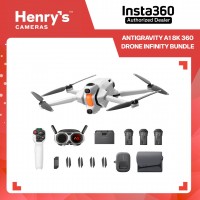
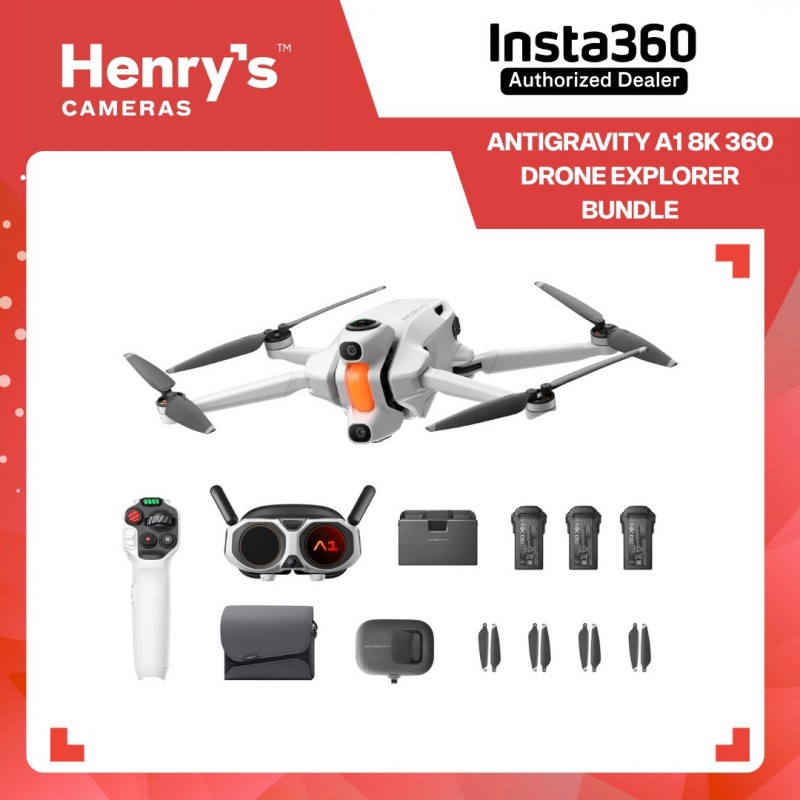
| In The Box | Antigravity A1 Drone 1x, Antigravity Vision Goggles 1x, Antigravity Grip Motion Controller 1x, Flight Battery 3x, Charging Hub 1x, Controller Strap 1x, Vision Battery 1x, Headband 1x, Foam Padding 1x, Lens Caps 1x, Battery Lanyard 1x, USB-C to DC Power Cable 1x, USB-C Charge Cable 1x, Spare Propellers 8x, Screwdriver 1x, Carry Case 1x, Sling Bag 1x, Corrective Lens Frame 1x, Lens Cloth 1x |
Limitless creativity and a new dimension in piloting await beginners and pros alike with the Antigravity A1 8K 360 Drone Explorer Bundle. Using the power of Insta360 algorithms, the top and bottom lenses stitch together a single 360° shot with the drone removed from the final video. By capturing every angle at up to 8K resolution, you can reframe the perfect shot later and incorporate different views into your content from just one flight. The piloting experience opens up as much as your content creation with the included Vision FPV goggles and Grip controller. Head tracking lets you look around as you fly for a realistic piloting experience like no other.
Fly Once for Infinite Results
The doors of aerial filmmaking are blown wide open with the ability to film in 360 at 8K resolution. Capturing more footage in one take gives you incredible freedom during editing and saves you flight time and battery life when on location.
- Full 360: Publish full 360° drone videos to show the world from every angle.
- Frame Later: By capturing every angle in 8K resolution, you don't have to frame the perfect shot the day you fly. Move your vantage point when editing to pick the angle you like best.
- Infinite Edits: The full 360° 8K footage you film immediately captures every view from the drone. With this ability, you can create dynamic content by transitioning to and editing footage from the side, behind, above, or below the drone as it flies.
- Social Media Master: With the sky fully captured, you can easily select any aspect ratio to clip out social media content. From a single video, you can create 1:1 posts, 16:9 videos, 9:16 reels, and more.
Auto Editing
While the A1 lets you take the time to frame shots later and infinitely edit your 360° footage, sometimes you just need a polished and ready-to-upload video right now. Antigravity offers two single-tap automatic editing options.
- One-Tap Cinematics: With a single tap in the Antigravity app, main subjects in your 360° footage are recognized, highlights are automatically identified, and cinematic movements are selected and added. All of this is done in sync with the music you've selected. It's an ideal solution to get dynamic and pro-quality videos done in minutes for quick sharing on social media.
- Free Your Frame: Accomplish simple reframing with a single tap. Tap to have the viewpoint in your footage smoothly swing from forward to the side, or down, or behind the A1.
Sky Genie Flight Modes
A selection of pre-programmed flight maneuvers can easily and quickly film a subject with cinematic results:
- Arc Shot: Flies towards a subject, partially circles it, then flies backwards.
- Spiral Ascent: Flies around a subject while simultaneously gaining altitude.
- Oval Orbit: Pulls away, then flies close in an oval pattern.
Share the Adventure
Friends and family can experience what it's like to virtually sit in the A1's cockpit, fly, and look around at the scenery. In real-time. Without having to pilot the drone. Simply use the Sky Path feature to set up a flight path for the A1 to automatically follow. Then, hand over the Vision goggles to the first viewer and let them sit back and enjoy the show.
Automatic Landing Gear
The futuristic filming and flight of the Antigravity A1 are also reflected in its operation. Once you power on the A1, the landing gear automatically folds out to let you place it safely on the ground. Once you take off, the landing gear automatically folds back inside and out again right before you land.
Safety First
In addition to integrated obstacle avoidance, Antigravity offers multiple features to ensure that you have a safe flight with the A1.
- FreeMotion: This mode automatically aligns the nose of the A1 with the flight direction, giving forward-facing sensors optimal positioning for obstacle avoidance while looking around with the Vision goggles.
- Payload Detection: If you add weight to the A1, it will automatically flag the excess weight upon takeoff, triggering an immediate landing to prevent misuse of the A1.
- With the press of a button, you can activate the Return to Home feature, which will have the A1 plot a course back to the takeoff point while using obstacle avoidance to stay safe along the way.
- While the ability to look around as you fly is a thrilling experience, it's important to keep tabs on where the drone is going. Navigation Assist helps with that by overlaying a smaller screen that shows the forward view of the A1.
Antigravity Vision
- VR-Quality Immersion: Traditional FPV gives you a forward-facing cockpit-eye view of the action, but the Vision goggles and A1 go further with head tracking. Use FreeMotion mode to lock forward flight and take a look around, as if you really were in the cockpit.
- External Display: One of the outside "eyes" of the Vision goggles is actually an external display. As you split canyons and zip through tight locations, everyone around you can watch what you see and share in the exhilaration.
- OmniLink 360: Antigravity's transmission system is designed to provide a stable, real-time view of your flight in the Vision goggles from up to 6.2 miles away.
- Virtual Cockpits: Blurring the lines of fantasy and reality, this feature increases the feeling of being in a cockpit by overlaying your video feed with one. Choose a traditional airplane view with windshield, faux propeller, and control panel, or go medieval by making it look like you're flying on the back of a dragon!
- Rewatch: Use the huge simulated screen of the Vision goggles to rewatch past flights, catch a movie, or enjoy other immersive content.
Antigravity Grip
No skill? No problem. The Grip is a one-handed remote for the A1 designed to provide intuitive kinetic control of the drone. Use the integrated flight stick, panning thumbwheel, and buttons, or use it like a magic wand to point to where you want the A1 to take you.
- FPV Mode: With a first-person view, simply tilt your wrist to bank the A1 right or left like a video game.
- FreeMotion Mode: Designed for everyone, this mode makes flying as easy as pointing and pulling the trigger. Hold your arm out and point the Grip in any direction; wherever you move your arm, the A1 will fly there. Point it up to gain altitude or to the right or left for side flying. You can even slowly rotate in place while side flying to capture an orbit shot of an object.
Additional A1 Details
- Use Deep Track to select a subject and have A1 follow it as it films
- Three high-capacity flight batteries included
- Up to 39 minutes of flight time per battery
- Drone registration required in some countries due to weight
- Replaceable lenses
- GNSS satellite navigation
- Up to 35.8 mph flight speed
- Folding design
- Dual-band Wi-Fi 5 (802.11ac) and Bluetooth support
Additional Vision Details
- Pancake lenses with 1" micro-OLED displays
- 2560 x 2560 resolution per eye
- 90° DFOV (approximately)
- View a 200" (equivalent) screen with HDR10+
- +2D to -5D diopter adjustment (works with corrective lenses for extended range)
- Low blue light with TUV Rheinland certification
- Up to 2.5 hours of battery life
- Recharges via USB-C
- Ultralight at only 12 oz
Additional Grip Details
- 2.4 GHz wireless frequency
- Up to 32.8' of transmission distance
- Up to 4 hours of battery life
- Up to 2.5 hours of charging time